
Logs and Asynchronous Tasks
View API request, drawing, and asynchronous task records, filter details by conditions, and track status, results, and refunds.
- New API saves request details, drawing records, and asynchronous tasks like video and music separately.
- After logging in, you can access "Usage Logs" or "Task Logs" from the left navigation.
- This page uniformly explains the three data partitions, task statuses, and API query methods.
The three partitions correspond to the following paths:
/usage-logs/common: General API usage logs and billing details;/usage-logs/drawing: Midjourney drawing tasks;/usage-logs/task: General asynchronous tasks like Suno and video.
Regular users can only view their own records. Admin and Root can switch between "All" and "Only Mine" in the top right corner of the page; when switched to "Only Mine", the page returns data according to regular user fields and permissions.
Usage Logs
- Click "Usage Logs" in the left sidebar or visit
/usage-logs/commonto view API requests and billing details.
Filtering Records
Available filter options for usage log record queries are as follows:
| Filter Option | Description |
|---|---|
| Time Range | Filter by record creation time, where both start and end times are included in the query range. |
| Model Name | Filter by model name. |
| Group | Filter by the group used in the request. |
| Log Type | All Types, Recharge, Consumption, Management, System, Error, Refund, Login. |
| API Key Name | Filter by API key name. |
| Request ID | Locate a request by New API Request ID. |
| Upstream Request ID | Locate a request by the Request ID returned or recorded by the upstream service. |
| Username (Admin/Root Only) | Filter by username in the administrator view. |
| Channel ID (Admin/Root Only) | Filter by Channel ID in the administrator view. |
Page Statistics
Statistical values in the filter bar are related to current permissions and filter conditions:
- Usage: Aggregates the quota of consumption records, which can be filtered by time, model, group, key, channel, and user conditions.
- RPM: Number of consumption requests within the last 60 seconds.
- TPM: Total number of input Tokens and output Tokens within the last 60 seconds.
List and Details
- Regular users can see Time and Type, Token, Model, Stream, Tokens, Cost, Duration, and Details columns.
- Admin/Root view can also display Channel and User columns.
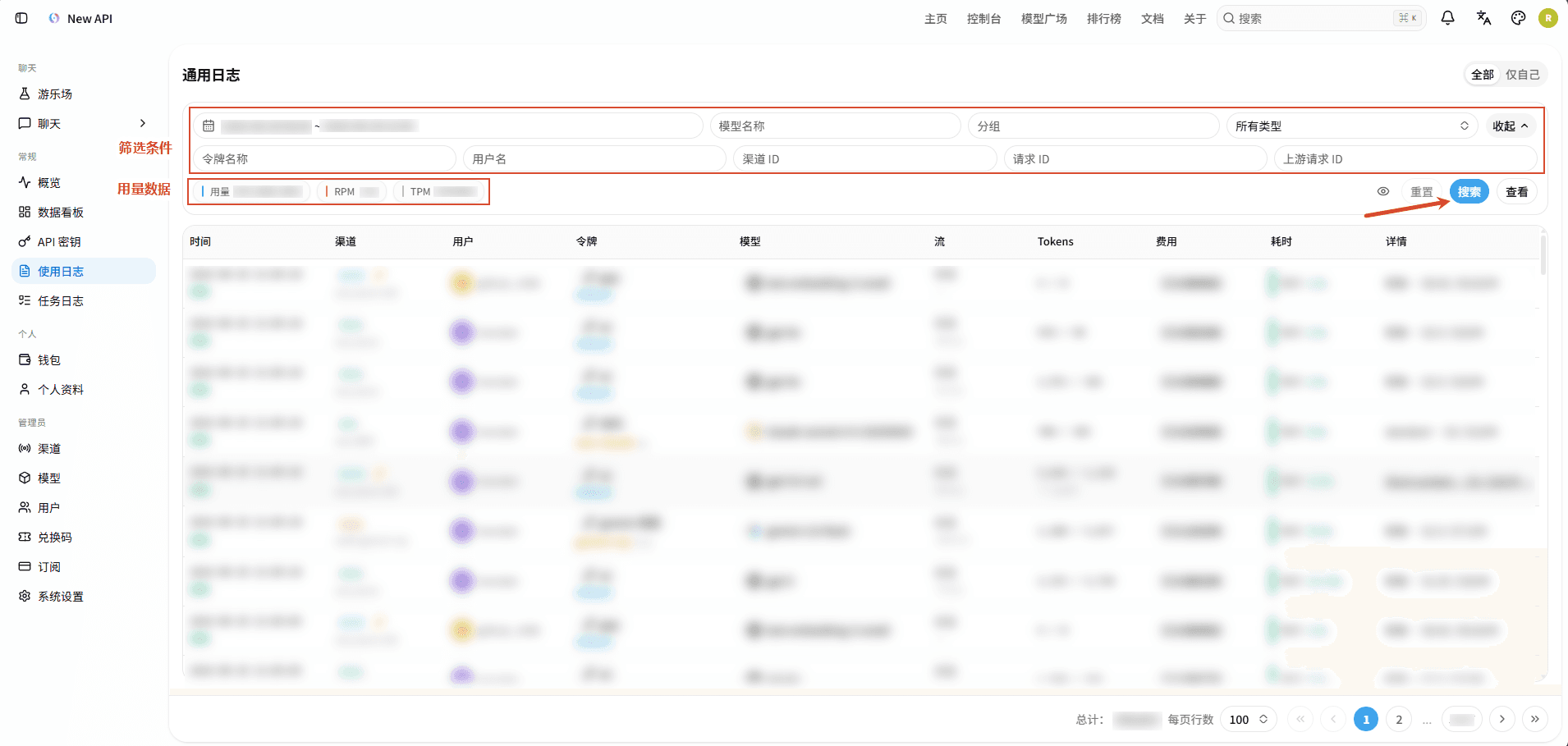
- Tokens: Displays input Tokens / output Tokens; when caching is used, cache read and write quantities may also be displayed.
- Cost: Displays the quota consumption or refund result for this record; the specific format depends on the instance's quota display method.
- Duration: Displays response duration for consumption or error records with timing data; streaming requests may additionally show First Response Time (FRT) and throughput information.
- Details: Clicking a record opens a details dialog. Depending on the log type and fields actually saved in the record, it may include Request ID, model mapping, error or refund reason, Token details, billing details, cache/audio/image usage, stream status, etc. Not all blocks will be displayed for every record.
- Administrators may also see channel retry chains, request transformations, billing paths, recharge audits, or management operation audits in the details.
- Why can't I see a specific record?
Whether consumption logs are written is controlled by the platform's "System Settings" → "Operations" → "Log Maintenance" → "Record Quota Usage" switch. If Root disables this setting, new consumption records may not be generated. Error logs are also subject to the error log switch and recordable error types; not every failed response will generate an Error record. The "Record IP Address" preference in user profiles only controls whether request IPs are saved for consumption logs and error request logs; other logs such as login, management audit, and recharge may record IPs according to their respective audit processes.
Task Logs
- "Task Logs" include "Drawing Logs" and "Asynchronous Task Logs".
- "Drawing Logs": Records Midjourney drawing task logs.
- "Asynchronous Task Logs": Records asynchronous tasks such as text-to-video, image-to-video, and audio generation.
Drawing Logs
- Click "Task Logs" → "Drawing Logs" in the left sidebar or visit
/usage-logs/drawingto view Midjourney drawing task records. - Regular users can only view their own tasks; Admin/Root can view tasks within their management scope in the "All" view and can additionally see channels and submission results.
Drawing logs support filtering by the following conditions:
- Date range;
- Midjourney Task ID;
- Channel ID (Admin/Root Only).
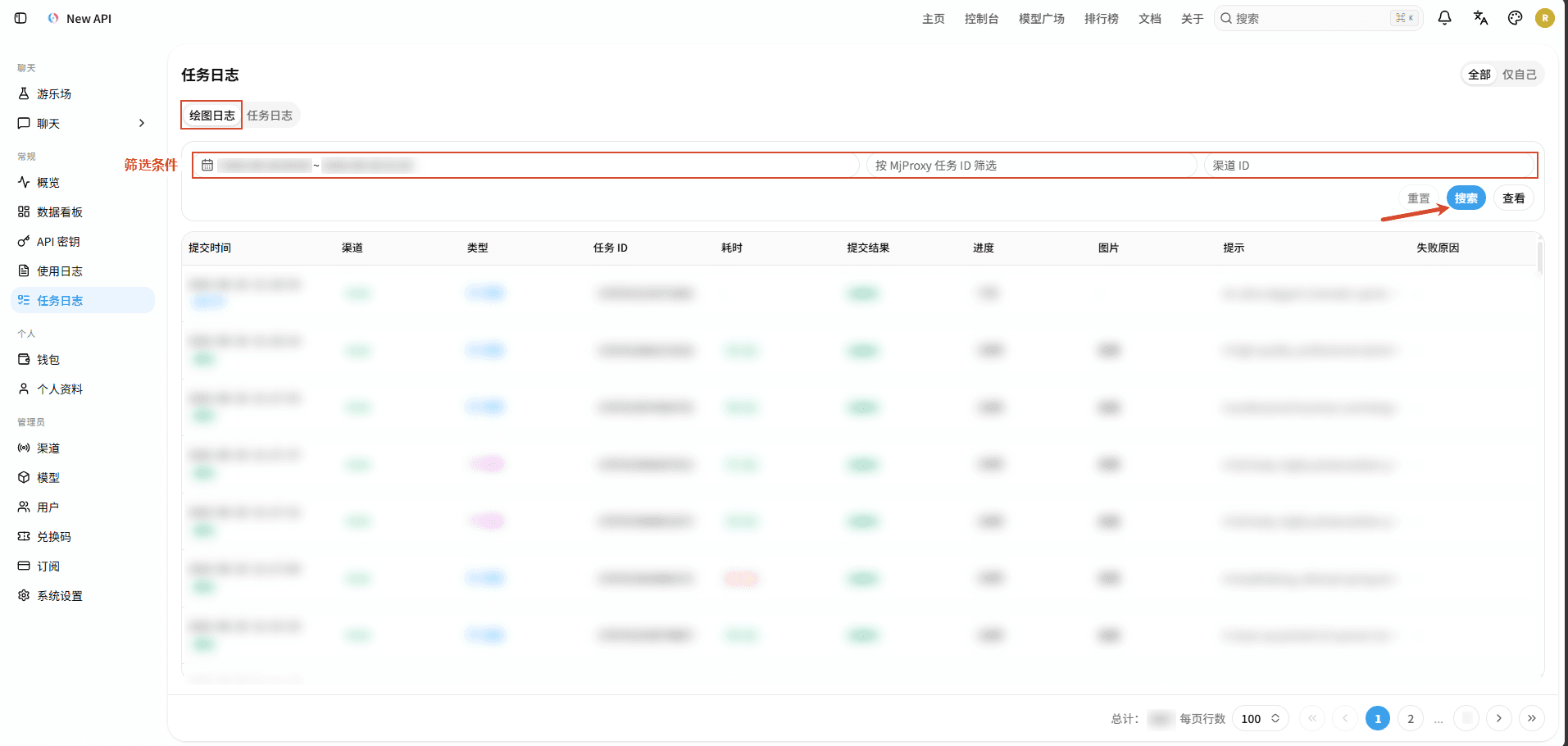
- The list includes submission time and status, Channel ID (Admin/Root Only), operation type, Task ID, duration, submission result, progress, image, prompt, and failure reason. Clicking the image opens a preview; clicking the prompt shows the full content; clicking the failure reason shows the full error message.
- Drawing statuses include: Not Started, Queued, In Progress, Success, Failed, Window Waiting.
- Drawing statuses are updated by background polling of upstream tasks. There is a polling interval, so task status may be delayed; when the backend retrieves the corresponding upstream task data, the system will mark Midjourney tasks submitted more than approximately 1 hour ago and still incomplete as failed.
Task Logs (Asynchronous Task Logs)
- Click "Task Logs" → "Asynchronous Task Logs" in the left sidebar or visit
/usage-logs/taskto view asynchronous task logs. Regular users can only view their own tasks; the Admin/Root view will also display Channel ID and User. - Asynchronous APIs for video, music, etc., do not return final results immediately upon request submission. After successful submission, New API returns a publicly accessible Task ID and saves the task record, then the backend polls the upstream service to update the status, progress, and results.
Filtering Tasks
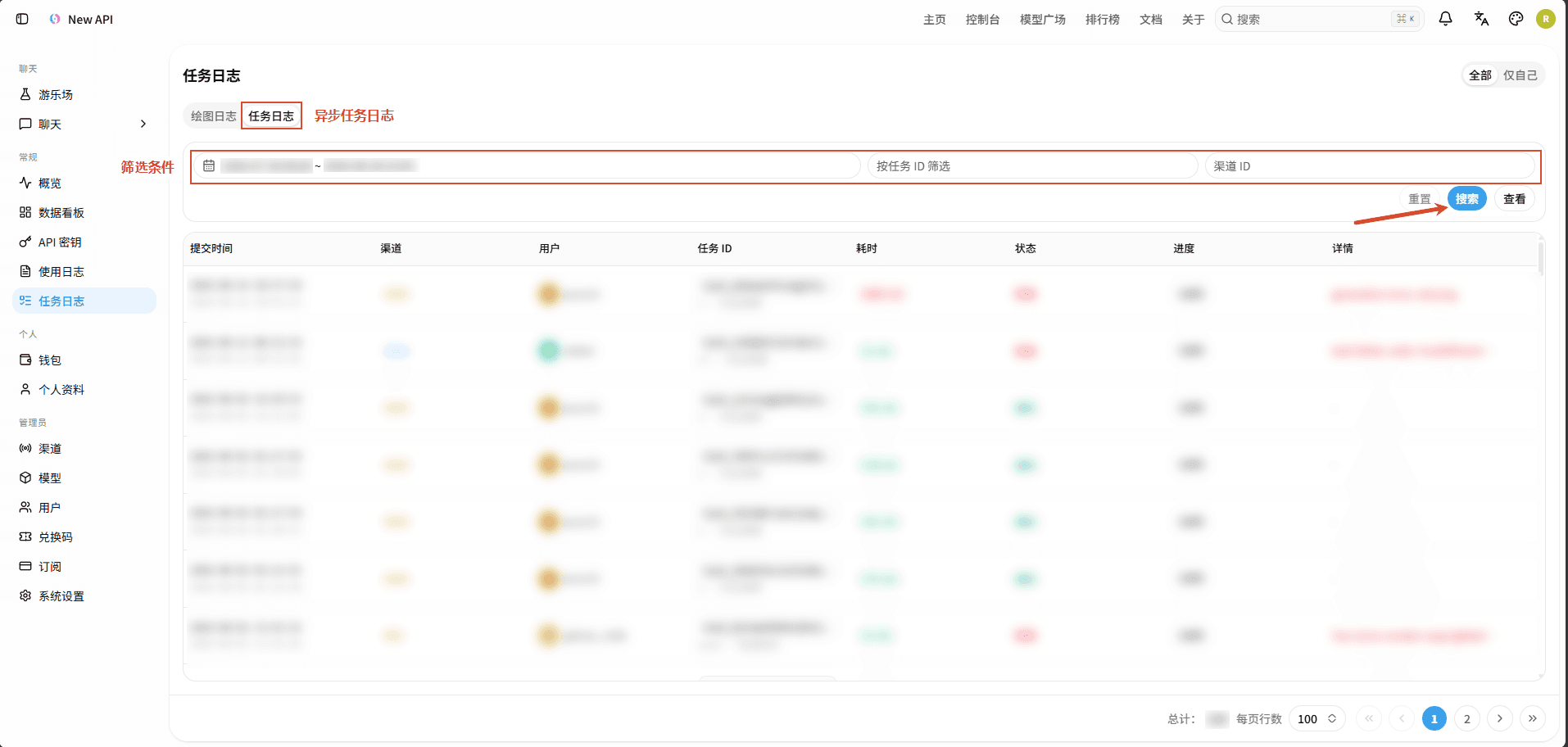
Task logs support filtering by the following conditions:
- Date range;
- Task ID;
- Channel ID (Admin/Root Only).
List and Results
The task list displays submission time and completion time, channel, user, Task ID, platform and operation, duration, status, progress, and details:
- When a Suno task is successful and returns an audio address, the details column provides an audio preview;
- Some video tasks will display a preview entry upon success; you can also use the same account's login session or API key to request
/v1/videos/{task_id}/contentto obtain the video content of completed tasks. This API verifies task ownership; it will not return content if the task is incomplete or does not belong to the current user; - Other failed records will display the failure reason in the details column, which can be clicked to view full information.
Task Status and Backend Processing
Asynchronous task logs use the following status values. Different platform adapters may sometimes retain the case or platform differences of upstream statuses, so API return values should be based on actual task records:
| Status | Meaning |
|---|---|
Not Started | The task record has been created but has not yet started processing. |
Queued | Submitted to upstream, awaiting further processing. |
In Queue | Has entered the processing queue. |
In Progress | Currently processing. |
Success | Completed, results can be viewed or retrieved. |
Failed | Processing failed; the failure reason will be written to the task record (if provided by upstream). |
Unknown | Internally defined fallback value for unknown status. |
Task statuses are updated by background polling, so the status of newly submitted tasks may be delayed. By default, asynchronous tasks are polled approximately every 15 seconds; polling only runs when UPDATE_TASK is enabled and there are incomplete tasks. The asynchronous task timeout threshold is controlled by TASK_TIMEOUT_MINUTES, which defaults to 1440 minutes; setting it to 0 disables timeout handling.
Failure, Timeout, and Refund
After a task enters a failed terminal state, if the task had a pre-deducted quota during the submission phase, the system will usually attempt a refund and write a Refund log upon successful refund. After a successful refund, the pending refund quota in the task record will be cleared, and the accumulated usage for the user and channel will be reduced; the number of requests will not be rolled back as a result.
The following situations may lead to temporary inconsistencies between page status and balance:
- The task had no pre-deducted quota (
quota = 0); - Refund from the funding source failed, the system will retain the task quota for retry or manual reconciliation;
- When troubleshooting refunds, please check both your wallet balance or remaining subscription quota (and the quota of active API keys) and the "Refund" records in the general usage logs. Do not solely rely on the "Failed" status to determine if a refund has been completed.
API Reference
Log Query APIs
If using the API instead of the console, you can call the following read-only APIs. These APIs are still subject to authentication and permission restrictions, and results for regular users will be strictly limited to the current account:
| Data | Admin API | User API | Time Parameter Unit |
|---|---|---|---|
| General Logs | GET /api/log/ | GET /api/log/self | Seconds (created_at) |
| Log Statistics | GET /api/log/stat | GET /api/log/self/stat | Seconds |
| Midjourney Drawing | GET /api/mj/ | GET /api/mj/self | Milliseconds (submit_time) |
| Asynchronous Tasks | GET /api/task/ | GET /api/task/self | Seconds (submit_time) |
Log and task list APIs use pagination parameters p and page_size; page numbers start from 1. When using normal positive integers, a page_size exceeding 100 will be truncated to 100. The total count of user logs is also affected by the instance's internal query limit. Task return data will not include private fields that may contain keys, upstream task identifiers, or billing context.
Additionally, GET /api/log/token can be used with an API key to read the most recent logs for that key. This API uses read-only token authentication: it verifies that the key exists, is not explicitly disabled, and its owner user is available, but it will not refuse queries due to key expiration or quota exhaustion; it returns a maximum of 1000 recent records.
Common query parameters for task list APIs are as follows:
| Scope | Method and Path | Common Query Parameters |
|---|---|---|
| Current User | GET /api/task/self | p, page_size, task_id, start_timestamp, end_timestamp; also accepts platform, action, status. |
| Admin/Root | GET /api/task/ | Adds channel_id to user API parameters, and can filter by platform, action, status. |
The start_timestamp and end_timestamp for task APIs use Unix second timestamps; Midjourney drawing API time parameters use milliseconds.
Asynchronous Generation and Task APIs
The following asynchronous generation and upstream task query APIs are provided by the instance according to configured channels and adapters. Submission and query APIs typically use API key authentication. Video content proxy supports both API keys and login sessions, and adheres to task ownership verification; the Midjourney image proxy is an exception that does not require an API key; the /api/task list API below uses logged-in user or administrator permissions. The specific authentication method is subject to API requirements.
| API | Path | Description |
|---|---|---|
| OpenAI Video Generation | POST /v1/videos | Creates an OpenAI-compatible asynchronous video generation task, returning a task identifier upon success. |
| OpenAI Video Task Query | GET /v1/videos/{task_id} | Queries the status, progress, and result information of a video generation task. |
| Video Content Retrieval | GET /v1/videos/{task_id}/content | Streams back completed video content; the system retrieves content from upstream based on task results or decodes saved data URLs. |
| Video Remix | POST /v1/videos/{video_id}/remix | Submits a new Remix asynchronous task based on an existing video. |
| Legacy Video Generation | POST /v1/video/generations | Compatible with legacy video generation paths, creates asynchronous video tasks. |
| Legacy Video Task Query | GET /v1/video/generations/{task_id} | Queries the status and results of legacy video generation tasks. |
| Kling Text-to-Video | POST /kling/v1/videos/text2video | Submits a text-to-video task using Kling format; the system will first perform request format conversion. |
| Kling Image-to-Video | POST /kling/v1/videos/image2video | Submits an image-to-video task using Kling format. |
| Kling Task Query | GET /kling/v1/videos/text2video/{task_id}GET /kling/v1/videos/image2video/{task_id} | Queries the results of Kling text-to-video or image-to-video tasks. |
| Jimeng Official API | POST /jimeng/ | Compatible with Jimeng official API format, distinguishing between task submission and query operations via parameters like Action and Version. |
| Suno Task Submission | POST /suno/submit/{action} | Submits a Suno music generation task; the specific task type is determined by the action parameter. |
| Suno Task Query | POST /suno/fetchGET /suno/fetch/{id} | Queries the Suno task list or the status and results of a specified task. |
| Midjourney Task Submission | POST /mj/submit/{action}POST /{mode}/mj/submit/{action} | Supports task operations such as imagine, describe, blend, change, simple-change, edits, video, action, modal, and shorten. |
| Midjourney Task Query | GET /mj/task/{id}/fetchGET /mj/task/{id}/image-seedPOST /mj/task/list-by-condition | Queries task status, image seeds, or task lists by condition; also supports paths with the {mode} prefix. |
| Midjourney Image Proxy | GET /mj/image/{id}GET /{mode}/mj/image/{id} | Retrieves or proxies generated images based on the Midjourney Task ID. |
| Midjourney Extended Operations | POST /mj/insight-face/swapPOST /mj/submit/upload-discord-images | Provides extended functionalities such as face swapping and uploading Discord images. |
Relationship with Data Dashboard
- Logs are detailed records, while the data dashboard provides statistics aggregated by time, model, user, or channel.
- Their filtering scope, refresh timing, and statistical methods may differ;
- New requests first appear in logs, and chart data may require aggregation or refresh before updating.
When troubleshooting a call, it is recommended to first locate the request in the general logs by time, model, Request ID, or Upstream Request ID; for asynchronous requests, record the task_id returned by the submission API, then query the final task status and failure details. If a task remains unchanged for a long time, check channel availability, task polling switch, timeout settings, and corresponding "Refund" logs.
How is this guide?
Last updated on