
User Guide
Using API and Playground
Use the playground to test and experience AI models online, and call New API via OpenAI-compatible interfaces.
Playground
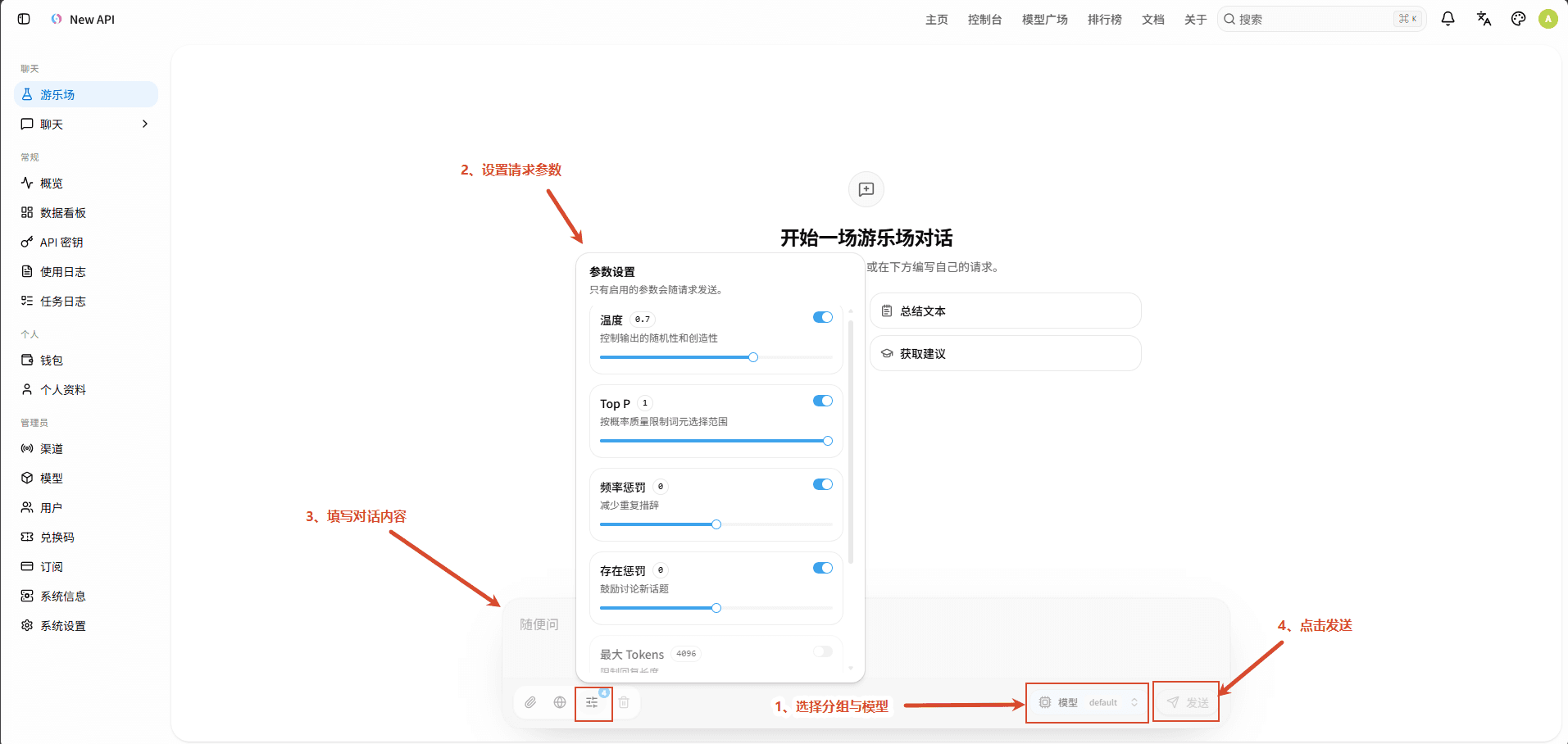
- The playground is used for simple online testing and experiencing AI models. Users can input questions or instructions, interact with the model, and view the generated results.
- Select Group and Model: In the bottom right of the input box, select the available model group and specific model to confirm the model used for this conversation.
- Set Request Parameters: Click the parameter settings button to enable and adjust generation parameters such as Temperature, Top P, Frequency Penalty, Presence Penalty, and Max Tokens as needed.
- Fill in Conversation Content: Enter questions, instructions, or prompts in the bottom input box; search, upload files, upload photos, screenshot, and photo-taking functions are not yet implemented.
- Send Request: After confirming the model, parameters, and input content, click the "Send" button to submit the request.
- View Response Results: After the model finishes generating, you can view the returned content in the conversation area and continue to input new questions for multi-turn conversations.
API Address and Authentication
The OpenAI-compatible address for the gateway is typically:
https://your-host/v1Use your API key as a Bearer Token:
Authorization: Bearer sk-your-api-keyFor example, with chat completions:
curl https://your-host/v1/chat/completions \
  -H "Content-Type: application/json" \
  -H "Authorization: Bearer sk-your-api-key" \
  -d '{"model":"gpt-4o-mini","messages":[{"role":"user","content":"你好"}]}'
SDK Examples
Python (OpenAI SDK)
from openai import OpenAI

client = OpenAI(
    api_key="sk-xxxxxxxx",
    base_url="https://your-host/v1",
)

response = client.chat.completions.create(
    model="gpt-4o-mini",
    messages=[{"role": "user", "content": "你好"}],
)
print(response.choices[0].message.content)
Claude Native Format
curl https://your-platform.com/v1/messages \
  -H "x-api-key: sk-xxxxxxxx" \
  -H "anthropic-version: 2023-06-01" \
  -H "content-type: application/json" \
  -d '{"model": "claude-3-5-sonnet-20241022", "max_tokens": 1024, "messages": [{"role": "user", "content": "Hello"}]}'
Gemini Native Format
curl "https://your-platform.com/v1beta/models/gemini-1.5-pro:generateContent?key=sk-xxxxxxxx" \
  -H "Content-Type: application/json" \
  -d '{"contents": [{"parts": [{"text": "Hello"}]}]}'
Supported API Endpoints
| Interface | Path | Description |
|---|---|---|
| Chat Completions | POST /v1/chat/completions | OpenAI Chat Completions compatible interface, requires model and messages, supports streaming or regular responses. |
| Playground Chat | POST /pg/chat/completions | Web playground specific interface, uses login session to select group and model, and reuses unified traffic splitting, protocol conversion, billing, and retry mechanisms. |
| Text Completions | POST /v1/completions | Traditional text completions interface, requires prompt and model. |
| Vector Embeddings | POST /v1/embeddings | Converts text or arrays of text into vectors, requires input, converted to upstream format by channel adapter. |
| Gemini Embeddings Compatible Interface | POST /v1/engines/{model}/embeddings | Compatible with older Gemini-style embedding paths, processes embedding requests based on the model name in the URL. |
| Image Generation | POST /v1/images/generations | Generates images based on prompts; specific model, size, quality, and quantity depend on request parameters and configured channels. |
| Image Editing | POST /v1/images/edits | Edits images based on input image and prompt, supports JSON and multipart/form-data requests. |
| Legacy Edit Interface | POST /v1/edits | Reserved compatible path, code enters image Relay processing; new clients are advised to prioritize using /v1/images/edits. |
| Speech to Text | POST /v1/audio/transcriptions | Converts audio to text, forwards to corresponding speech recognition channel according to OpenAI audio interface format. |
| Audio Translation | POST /v1/audio/translations | Recognizes audio content and outputs translated text. |
| Text to Speech | POST /v1/audio/speech | Converts input text to audio. |
| Rerank | POST /v1/rerank | Reranks candidate documents based on query for relevance, requires non-empty query content and document list. |
| Content Moderation | POST /v1/moderations | Performs content moderation on text or other inputs; if no model is provided, a default moderation model candidate will be used. |
| Responses API | POST /v1/responses | OpenAI Responses format interface, supports capabilities such as input, tools, and response events. |
| Responses Compression | POST /v1/responses/compact | Performs compression processing on Responses request context. |
| Codex Web Search | POST /v1/alpha/search | Codex independent web search format interface, currently only allows processing by Sub2API, New API, Codex, and advanced custom channels that support this capability. |
| Claude Messages | POST /v1/messages | Anthropic Claude Messages compatible interface, requires model and message content, converted to upstream protocol by New API when necessary. |
| Realtime Conversation | GET /v1/realtime (WebSocket) | OpenAI Realtime style bidirectional real-time communication interface, models are usually passed via query parameters, and API keys can be passed via Bearer Token or WebSocket subprotocol. |
| Gemini Native Model Invocation | POST /v1beta/models/{model}:{action} | Gemini native format interface, supports model operation paths, such as generateContent, streamGenerateContent, and embedding-related operations. |
| Gemini Compatible Model Invocation | POST /v1/models/{model}:{action} | Accepts Gemini-style model operation requests with the /v1 prefix, parsed and converted by Gemini Relay. |
| Model List | GET /v1/models | Returns OpenAI format model list by default; returns Claude format when using Anthropic request headers, and Gemini format when using x-goog-api-key or key query parameters. |
| Model Details | GET /v1/models/{model} | Queries single model information; returns model_not_found error object if the model does not exist. |
| Gemini Model List | GET /v1beta/models | Returns a list of available models in Gemini format, response fields include models and nextPageToken. |
| OpenAI Format Model List | GET /v1beta/openai/models | Returns a model list in OpenAI format under the Gemini compatible namespace. |
How is this guide?
Last updated on