
渠道
上游渠道必须是部署方合法拥有或已获授权的账号、API Key、模型服务或企业合约。负载均衡、故障自动切换、加权随机、多密钥管理等功能用于高可用和企业多账号管理,使用时应遵守上游服务条款、平台规则和监管要求。
在这里可以管理 NewAPI 的上游渠道
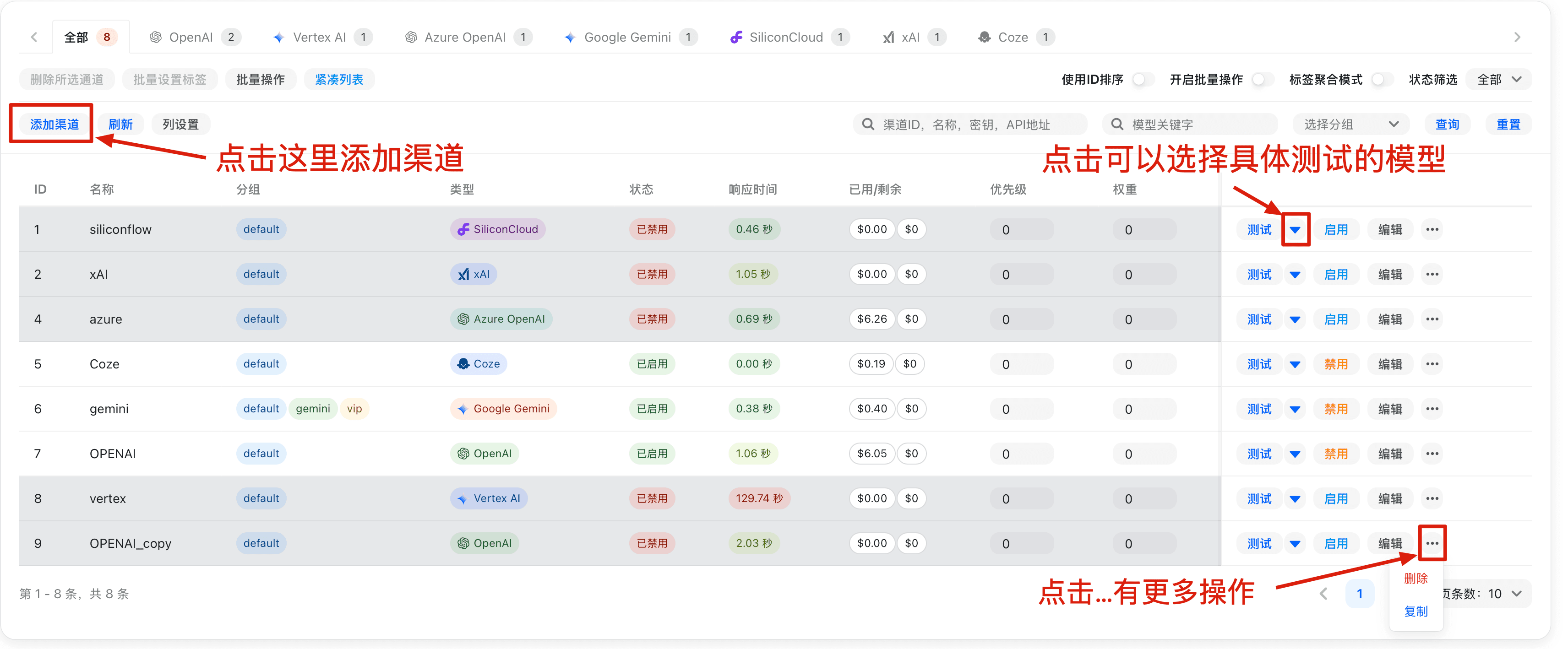
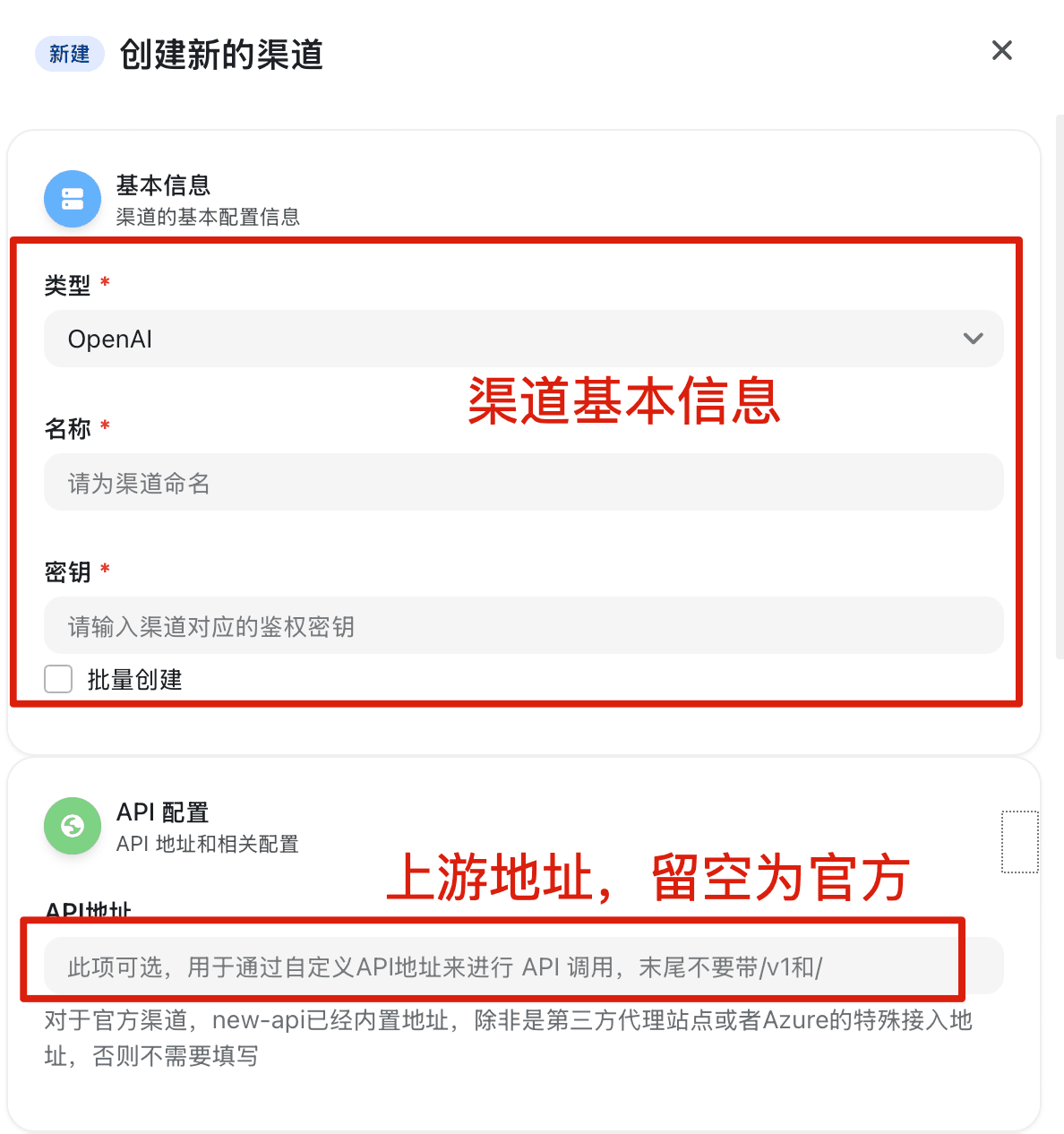
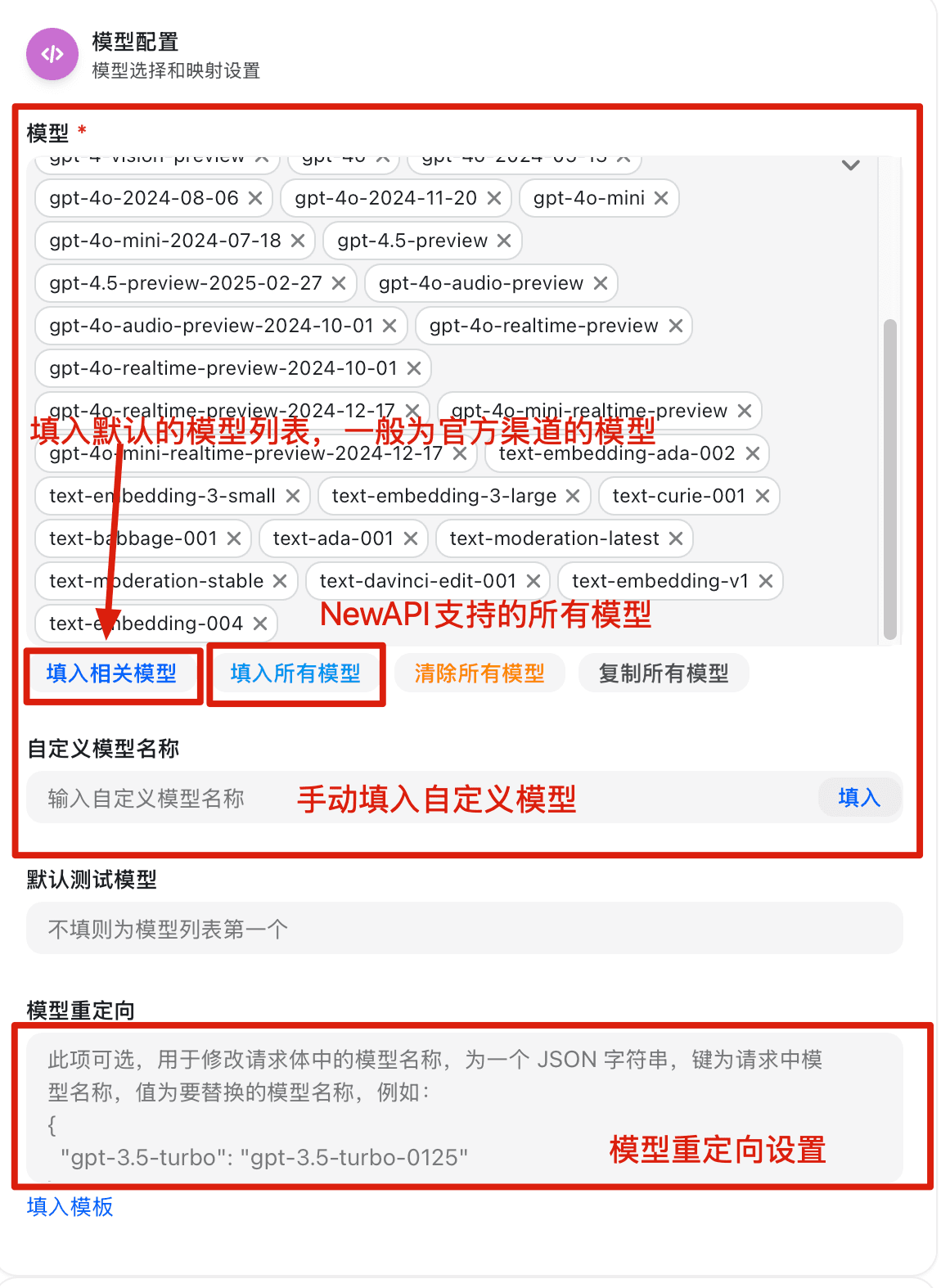
渠道创建/编辑页面
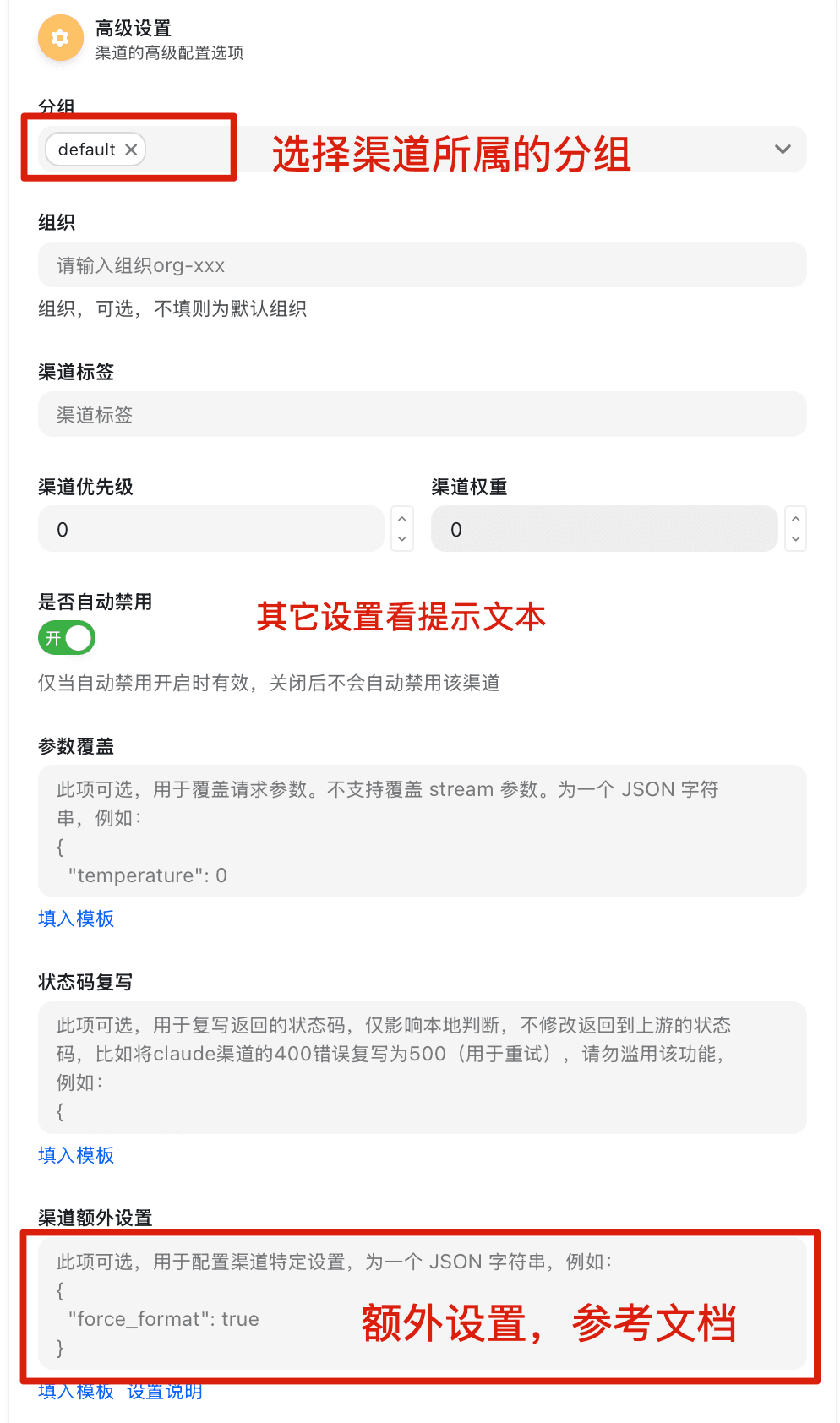
参数覆盖设置文档
概述
参数覆盖系统支持两种模式:简单覆盖模式(向前兼容)和高级操作模式。通过灵活的条件判断和操作类型,可以实现复杂的参数动态调整。参数覆盖功能只能用于兼容合法上游接口格式、企业网络兼容和请求规范化。
使用方式
简单覆盖模式
向前兼容性,直接指定要覆盖的字段和值,系统会将这些字段合并到原始请求中
{
  "temperature": 0.8,
  "max_tokens": 2000,
  "model": "gpt-4"
}
高级操作模式
通过 operations 数组定义复杂的参数操作,支持条件判断、数组操作、字符串拼接与字符串规范化等高级功能
基本结构
{
  "operations": [
    {
      "path": "temperature",
      "mode": "set",
      "value": 0.8,
      "conditions": [...],
      "logic": "AND"
    }
  ]
}
字段说明(按需填写):
mode: 必填path: 适用于set/delete/append/prepend/trim_prefix/trim_suffix/ensure_prefix/ensure_suffix/trim_space/to_lower/to_upper/replace/regex_replacevalue: 常见于set/append/prepend/trim_prefix/trim_suffix/ensure_prefix/ensure_suffixfrom/to: 适用于move/copy/replace/regex_replacekeep_origin: 用于set(已有值则跳过)以及对象合并时的append/prepend
操作模式 (mode)
1. set - 设置值
设置指定路径的值
{
  "path": "temperature",
  "mode": "set",
  "value": 0.8,
  "keep_origin": false
}
参数说明:
keep_origin: 为true时,如果目标路径已存在值则跳过设置
2. delete - 删除字段
删除指定路径的字段
{
  "path": "messages.0",
  "mode": "delete"
}
3. move - 移动字段
将一个字段的值移动到另一个位置
{
  "mode": "move",
  "from": "messages.0.content",
  "to": "system"
}
4. append - 追加内容
在现有内容后追加新内容
{
  "path": "messages.0.content",
  "mode": "append",
  "value": "\n\n请用中文回答。"
}
支持的数据类型:
- 字符串: 在原字符串末尾追加
- 数组: 在数组末尾添加元素(支持添加单个元素或数组)
- 对象: 合并对象属性
5. prepend - 前置内容
在现有内容前添加新内容
{
  "path": "messages.0.content",
  "mode": "prepend",
  "value": "重要提示:请仔细阅读以下内容。\n\n"
}
支持的数据类型:
- 字符串: 在原字符串开头前置
- 数组: 在数组开头添加元素(支持添加单个元素或数组)
- 对象: 合并对象属性
6. copy - 复制字段
将 from 指定路径的值复制到 to 指定路径(不删除源字段)
{
  "mode": "copy",
  "from": "model",
  "to": "original_model"
}
参数要求:
from/to: 必填- 源路径不存在时会报错
7. trim_prefix - 去除前缀
对字符串字段去除指定前缀(若不匹配则不变)
{
  "path": "model",
  "mode": "trim_prefix",
  "value": "openai/"
}
参数要求:
value: 必填
8. trim_suffix - 去除后缀
对字符串字段去除指定后缀(若不匹配则不变)
{
  "path": "model",
  "mode": "trim_suffix",
  "value": "-latest"
}
参数要求:
value: 必填
9. ensure_prefix - 确保前缀
确保字符串字段以指定前缀开头(已存在则不变)
{
  "path": "model",
  "mode": "ensure_prefix",
  "value": "openai/"
}
参数要求:
value: 必填且不能为空字符串
10. ensure_suffix - 确保后缀
确保字符串字段以指定后缀结尾(已存在则不变)
{
  "path": "model",
  "mode": "ensure_suffix",
  "value": "-latest"
}
参数要求:
value: 必填且不能为空字符串
11. trim_space - 去除首尾空白
对字符串字段执行 TrimSpace(空格、换行、制表符等都会被移除)
{
  "path": "model",
  "mode": "trim_space"
}
12. to_lower - 转小写
将字符串字段转换为小写
{
  "path": "model",
  "mode": "to_lower"
}
13. to_upper - 转大写
将字符串字段转换为大写
{
  "path": "model",
  "mode": "to_upper"
}
14. replace - 字符串替换
对字符串字段执行子串替换
{
  "path": "model",
  "mode": "replace",
  "from": "openai/",
  "to": ""
}
参数要求:
from: 必填且不能为空字符串to: 可选,省略时等同于空字符串
15. regex_replace - 正则替换
对字符串字段执行正则匹配替换
{
  "path": "model",
  "mode": "regex_replace",
  "from": "^gpt-",
  "to": "openai/gpt-"
}
参数要求:
from: 必填(正则表达式,Go regexp 语法)to: 可选,省略时等同于空字符串
条件判断
通过 conditions 数组设置操作执行的条件,仅当条件满足时才会执行对应操作
条件结构
{
  "conditions": [
    {
      "path": "model",
      "mode": "contains",
      "value": "gpt-4",
      "invert": false,
      "pass_missing_key": false
    }
  ],
  "logic": "AND"
}
条件匹配模式
-
full: 完全匹配(默认) -
prefix: 前缀匹配 -
suffix: 后缀匹配 -
contains: 包含匹配 -
gt: 大于(仅数字类型) -
gte: 大于等于(仅数字类型) -
lt: 小于(仅数字类型) -
lte: 小于等于(仅数字类型) -
须知:
- 数值比较只能用于数字类型
- 字符串操作(prefix、suffix、contains)会将值转换为字符串进行比较
条件参数说明
invert: 反选功能,true表示取反结果pass_missing_key: 当指定路径不存在时的行为true: 路径不存在时条件通过false: 路径不存在时条件不通过(默认)
逻辑关系 (logic)
AND: 所有条件都必须满足OR: 任意条件满足即可(默认)
路径语法
使用 JSON 路径语法访问嵌套字段:
temperature- 根级字段messages.0.content- 数组第一个元素的 content 字段messages.-1.content- 数组最后一个元素的 content 字段metadata.user.name- 嵌套对象字段
同时,path 支持以下内置变量(无需在请求体中显式存在),可直接用于条件判断:
| 变量 | 含义 | 典型用途 |
|---|---|---|
model / upstream_model | 重定向后的目标模型 | 按实际调用的上游模型做条件匹配 |
original_model | 重定向前的目标模型 | 按用户请求的原始模型做条件匹配 |
实用示例
1. 动态调整模型参数
根据消息内容动态调整温度参数:
{
  "operations": [
    {
      "path": "temperature",
      "mode": "set",
      "value": 0.3,
      "conditions": [
        {
          "path": "messages.0.content",
          "mode": "contains",
          "value": "代码"
        }
      ]
    },
    {
      "path": "temperature",
      "mode": "set",
      "value": 0.9,
      "conditions": [
        {
          "path": "messages.0.content",
          "mode": "contains",
          "value": "创意"
        }
      ]
    }
  ]
}
2. 添加系统提示
在消息数组开头添加系统消息:
{
  "operations": [
    {
      "path": "messages",
      "mode": "prepend",
      "value": [
        {
          "role": "system",
          "content": "你是一个专业的AI助手,请始终保持礼貌和专业。"
        }
      ]
    }
  ]
}
3. 根据模型类型调整参数
根据不同模型设置不同的 max_tokens:
{
  "operations": [
    {
      "path": "max_tokens",
      "mode": "set",
      "value": 4000,
      "conditions": [
        {
          "path": "model",
          "mode": "prefix",
          "value": "gpt-4"
        }
      ]
    },
    {
      "path": "max_tokens",
      "mode": "set",
      "value": 2000,
      "conditions": [
        {
          "path": "model",
          "mode": "prefix",
          "value": "gpt-3.5"
        }
      ]
    }
  ]
}
4. 多条件组合(AND逻辑)
同时满足多个条件时才执行操作:
{
  "operations": [
    {
      "path": "stream",
      "mode": "set",
      "value": false,
      "conditions": [
        {
          "path": "model",
          "mode": "contains",
          "value": "claude"
        },
        {
          "path": "messages.0.content",
          "mode": "contains",
          "value": "长文"
        }
      ],
      "logic": "AND"
    }
  ]
}
5. 数值比较条件
根据数值大小进行条件判断:
{
  "operations": [
    {
      "path": "temperature",
      "mode": "set",
      "value": 0.1,
      "conditions": [
        {
          "path": "max_tokens",
          "mode": "gt",
          "value": 1000
        }
      ]
    }
  ]
}
6. 反选条件
使用 invert 实现反选逻辑:
{
  "operations": [
    {
      "path": "stream",
      "mode": "set",
      "value": true,
      "conditions": [
        {
          "path": "model",
          "mode": "contains",
          "value": "gpt-3.5",
          "invert": true
        }
      ]
    }
  ]
}
7. 处理缺失字段
使用 pass_missing_key 处理可能不存在的字段:
{
  "operations": [
    {
      "path": "temperature",
      "mode": "set",
      "value": 0.7,
      "conditions": [
        {
          "path": "custom_field",
          "mode": "full",
          "value": "special",
          "pass_missing_key": true
        }
      ]
    }
  ]
}
8. 字符串拼接示例
在用户消息后追加指导语:
{
  "operations": [
    {
      "path": "messages.-1.content",
      "mode": "append",
      "value": "\n\n请详细解释你的思考过程。"
    }
  ]
}
注意事项
执行顺序: 操作按照在 operations 数组中的顺序依次执行,前面的操作会影响后续操作
这篇文档对您有帮助吗?
最后更新于